Choosing the right Over Ear Gaming Headset is no longer a simple comfort decision. It affects spatial awareness, communication, fatigue, and immersion during long gaming sessions.
Market data shows why the category deserves closer evaluation. Grand View Research estimates that the global gaming headset market reached approximately USD 2.4 billion in 2023. Its forecast also indicates continued growth through 2030. Newzoo reported more than 3.3 billion players worldwide in 2023, creating a broad audience for gaming audio products. However, market growth does not guarantee better buying decisions. Specifications can look impressive while clamping pressure, microphone clarity, or software stability disappoints in daily use.
John Couling, a former senior executive at Dolby Laboratories, described gaming audio clearly: “Sound is half the experience.” That principle matters when footsteps shift behind you or a teammate speaks through a noisy room. A strong Over Ear Gaming Headset should balance accurate imaging, controlled bass, breathable materials, and dependable wireless performance. Battery life matters too, especially when charging cables interrupt a late-night match.
Numbers can mislead.
A 50-millimeter driver is not automatically superior. Surround sound may also sound artificial without careful tuning. Personal testing remains valuable, even when professional reviews agree. Your glasses, head shape, console, and preferred games can change the result. This guide examines those practical details, while acknowledging one uncomfortable truth: no headset performs perfectly for every player.
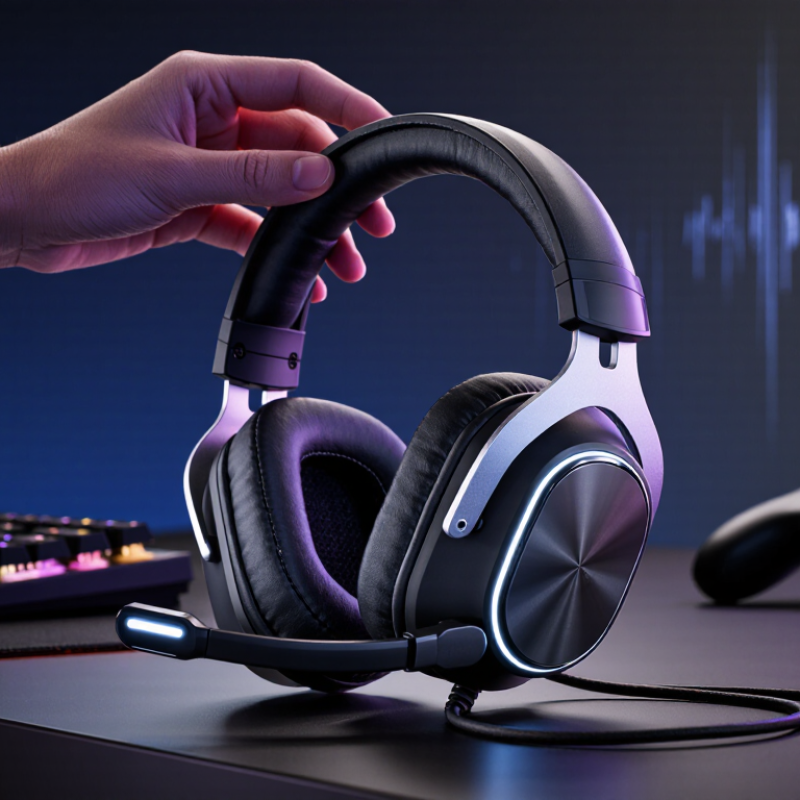
Before choosing an over-ear gaming headset, define what you actually play. Competitive shooters need clear positional audio and controlled bass. Story-driven games may benefit from a wider, more spacious presentation. Multiplayer sessions require a microphone that keeps speech natural in a noisy room. Your priorities should guide the design, not attractive specifications alone.
Your listening environment matters just as much. In a shared bedroom, closed-back earcups can reduce outside distractions and prevent sound leakage. In a quiet room, open-back earcups may create a more natural sense of space. However, they also let nearby conversations enter your game. Check the headset’s clamp, padding, and weight during longer sessions. Glasses can create pressure points within an hour. Small discomfort becomes a serious problem later.
I once focused too heavily on deep bass. Explosions sounded impressive, but footsteps became harder to separate. That choice was exciting, yet not practical. Test familiar game sounds at moderate volume before deciding. Listen for distant movement, reload clicks, and teammate voices. A reliable microphone should reject keyboard noise without making your voice thin. Wired models usually offer consistent connection, while wireless models add convenience and battery concerns. Remember your actual routine: late-night play, long tournaments, or short sessions after work. The best fit may be less dramatic than expected.
Choosing an over-ear gaming headset starts with how it feels after thirty minutes, not how it looks in a product photo. I test the headset while sitting upright and turning my head. The ear cushions should surround the ears without pressing the jaw. A light frame helps, but weight distribution matters more than the specification sheet suggests. My own mistake was choosing very soft padding that became hot quickly. Comfort is not only softness.
Fit depends on head shape, hair, and whether you wear glasses. The clamp should hold the headset securely without creating pressure around the temples. A loose fit may shift during quick movements, while excessive tension can cause headaches. Adjust the headband in small steps, then check whether the ear cups remain centered. Small details matter. If possible, wear the headset for at least fifteen minutes before judging it.
Build quality appears in the hinges, headband joints, buttons, and cable connection. Move each hinge gently and listen for unusual clicking or uneven resistance. A flexible frame can survive daily use, but excessive twisting still creates damage. Replaceable ear cushions may extend practical service life. Plastic is not automatically weak, and metal is not automatically better. That assumption needs reconsideration. I once trusted a heavy frame too much, only to find its hinge uncomfortable and stiff. Examine the pressure points, not just the materials.
Choosing an over-ear gaming headset starts with sound performance, not exaggerated feature lists. In practical testing, listen for clear footsteps, controlled bass, and separated voices. Imaging matters more than extreme volume. A wide soundstage can help, but virtual surround sometimes makes positional audio blurry. Use a familiar game and compare stereo with spatial modes.
Microphone quality deserves equal attention. Record your voice in a quiet room, then repeat beside a running fan. Check clarity, background suppression, sidetone, and plosive control. ITU-T P.808 provides methods for judging speech quality through realistic listening tests. A high sample rate alone proves little. The microphone must sound natural.
I once trusted a specification sheet and missed harsh sibilance during real conversation.
Tips: Keep the headset at a comfortable level. The World Health Organization’s 2021 World Report on Hearing says over 1.5 billion people live with hearing loss, and unsafe listening can increase risk. Test several EQ profiles, but avoid boosting every frequency. Check latency during fast dialogue and confirm compatibility with your console or computer. Wireless battery claims should be tested with the microphone active. Newzoo’s 2024 Global Games Market Report estimates 3.42 billion players worldwide, so comfort, accessibility, and flexible connection options deserve serious attention. Some preferences remain personal. That is worth admitting.
Choosing the best over ear gaming headset begins with device compatibility, not appearance. Check the connector, operating system support, and available audio ports before buying. A headset may work on a computer but lose microphone functions on a console or mobile device.
I test each headset on my actual setup. On a desktop, I check whether one plug carries both sound and voice. Older computers may need a separate adapter. Wireless models require compatible receivers, USB ports, or Bluetooth support. Bluetooth can add noticeable delay during fast games. A dedicated wireless receiver usually provides steadier timing, but it still occupies a port. Keep that detail in mind.
Connectivity should match your routine. Wired headsets avoid battery worries and often deliver consistent sound. Wireless options provide freedom when you move between a desk and a couch. I once chose a wireless headset without checking battery life. It stopped working during a long evening session. That mistake changed my testing habits. I now inspect charging time, connection range, and whether the headset works while charging.
Controls deserve hands-on attention. A raised mute button is easier to find than a flat touch panel. Test the volume wheel with one hand while wearing the headset. Check whether game and chat volume can be adjusted separately. Some controls feel convenient in a shop but become confusing in darkness. I prefer simple buttons, though this preference may not suit everyone. Test them with your eyes closed.
| Decision factor | Option or specification | Typical compatibility | Practical performance | Best choice when... |
|---|---|---|---|---|
| Device connection | 3.5 mm analog audio | Most computers, controllers, handheld devices, and audio jacks | Simple, widely compatible, and does not require charging; microphone support depends on the device jack and adapter | You use several devices and want the fewest compatibility issues |
| Device connection | USB wired | Computers and compatible USB host devices; console support varies by model and software | Digital audio, built-in controls, and possible virtual surround features; requires an available USB port | You mainly play on a computer and prefer stable, low-latency audio |
| Wireless connection | 2.4 GHz wireless receiver | Devices with a compatible USB-A or USB-C port; console compatibility must be checked separately | Usually designed for gaming with low delay; receiver range and interference can affect reliability | You want wireless freedom without relying on standard Bluetooth |
| Wireless connection | Bluetooth | Phones, tablets, laptops, and other Bluetooth-enabled devices; gaming-console support is limited or model-dependent | Convenient for everyday use; audio delay and microphone quality may vary by codec, device, and operating mode | You want one headset for gaming, mobile use, and general listening |
| Multi-device use | Dual wireless or wireless plus wired support | Depends on the headset’s radio design, firmware, and device profiles | May allow audio from two sources, but mixing and call handling vary considerably | You switch frequently between a computer, phone, and gaming device |
| Console compatibility | Platform-specific wireless or USB support | Varies by console generation, USB audio rules, wireless licensing, and included receiver | Game audio may work while chat, sidetone, or volume controls require additional support | You primarily play on a console and need game chat to work reliably |
| Microphone connection | Detachable, retractable, or fixed boom microphone | Physical design determines whether the headset can be used as regular headphones without a microphone | Boom microphones generally provide clearer voice pickup than built-in earcup microphones | You need clear team communication and occasional music or travel use |
| On-headset controls | Volume wheel, microphone mute, power, and connection buttons | Available controls vary by model and connection mode | Physical controls are faster during gameplay than switching to system menus | You adjust volume or mute frequently while playing |
| Chat management | Game/chat balance and sidetone | Requires hardware and software support; some consoles restrict advanced controls | Lets you balance teammates against game audio and hear your own voice naturally | You play team-based games or use voice chat often |
| Software controls | Equalizer, firmware updates, remapping, and presets | Usually strongest on computers; mobile and console features may be reduced | Offers more customization but may require background software or an account | You want to tune sound profiles or update device performance |
| Battery | Rechargeable wireless battery | Applies to wireless modes; wired operation during charging depends on the model | Longer rated runtime reduces charging frequency, but lighting, volume, and wireless mode affect actual use | You want cable-free sessions lasting several hours |
| Portability and comfort | Foldable hinges, replaceable cushions, weight, and clamp force | Physical design affects fit more than connection type | Over-ear cups can reduce outside noise and improve comfort, but heat buildup may increase during long sessions | You play for extended periods or move the headset between locations |
Compatibility note: Always verify the headset’s supported platforms, required adapter, microphone functions, wireless mode, and available controls for your exact devices before purchasing.
How to Choose the Best Over Ear Gaming Headset
Balance Price, Durability, and Long-Term Value
When I test an over ear gaming headset, I do not judge it by sound alone. I wear it for two-hour sessions and note pressure around my ears, jaw, and glasses. A comfortable fit matters because small discomfort becomes distracting during long matches. Memory foam should feel supportive, not hot or loose. Check whether the headband flexes gently and whether the hinges resist unnecessary twisting.
Price deserves context. A cheaper headset may look attractive, but a fragile cable or peeling padding can create replacement costs within months. A higher price is worthwhile only when materials, repair options, and consistent performance support it. Look for a detachable cable, reinforced joints, replaceable ear cushions, and clear warranty terms. Wireless models also need dependable battery life, stable connection, and a practical charging method.
Audio quality should match your use. Competitive players may need precise positional detail, while casual players often prefer warmer, fuller sound. A clear microphone is essential for teamwork, but software should not require complicated setup. I once valued extra features too highly and ignored weak hinges. That mistake changed my buying checklist. Reviews help, but personal fit remains decisive. Test the headset when possible, because specifications cannot reveal every pressure point. A durable design may feel plain, yet it can deliver better value after years of regular use.
Competitive shooters need clear footsteps and controlled bass. Story games may benefit from a wider, more spacious presentation. Test reload clicks, distant movement, and teammate voices.
Closed-back earcups suit shared bedrooms and reduce sound leakage. Open-back designs can feel more spacious in quiet rooms. Nearby conversations may still interrupt you. Consider your room.
Check the clamp, padding, and weight while wearing the headset. Glasses may create painful pressure points within an hour. Small discomfort becomes serious later. Comfort matters.
Compare stereo and spatial modes in a familiar game. Excessive bass can hide footsteps and voices. Moderate volume often reveals more detail. Louder is not always better.
Record your voice in a quiet room, then test beside a running fan. Check clarity, keyboard-noise rejection, sidetone, and plosive control. A high sample rate proves little. Natural speech matters.
Wired models avoid battery concerns and usually provide consistent connection. Wireless models offer freedom between a desk and couch. Check range, charging time, and performance while charging. I once ignored battery life. It stopped mid-session.
Confirm the connector, operating system support, and available audio ports. Some computers need a separate adapter for microphone input. Wireless models may require a receiver, USB port, or Bluetooth support. Bluetooth can add delay.
Raised mute buttons are easier to find than flat touch panels. Test the volume wheel with one hand. Check separate game and chat controls. Try them with your eyes closed. Simple buttons work for me, but not everyone.
Choosing the best Over Ear Gaming Headset starts with understanding how and where you play. Consider whether you need it for competitive gaming, casual sessions, or use across different activities, and think about your room, background noise, and typical listening volume. Comfort matters just as much: check the fit, ear-cup padding, weight, adjustability, and build quality, especially if you wear a headset for several hours at a time.
Next, compare audio clarity, positional sound, microphone quality, and any useful sound controls or features. Make sure the headset works with your gaming devices and offers the connectivity and onboard controls you prefer. Finally, weigh its price against its durability and expected lifespan. A well-chosen headset should meet your needs, feel comfortable, and deliver reliable performance over time without paying for features you are unlikely to use.